
Single-host network in OpenSandbox
Detailed routing for a single-host deployment: how execd’s proxy gives every sandbox access to HTTP and WebSocket ports through one exposed host port.
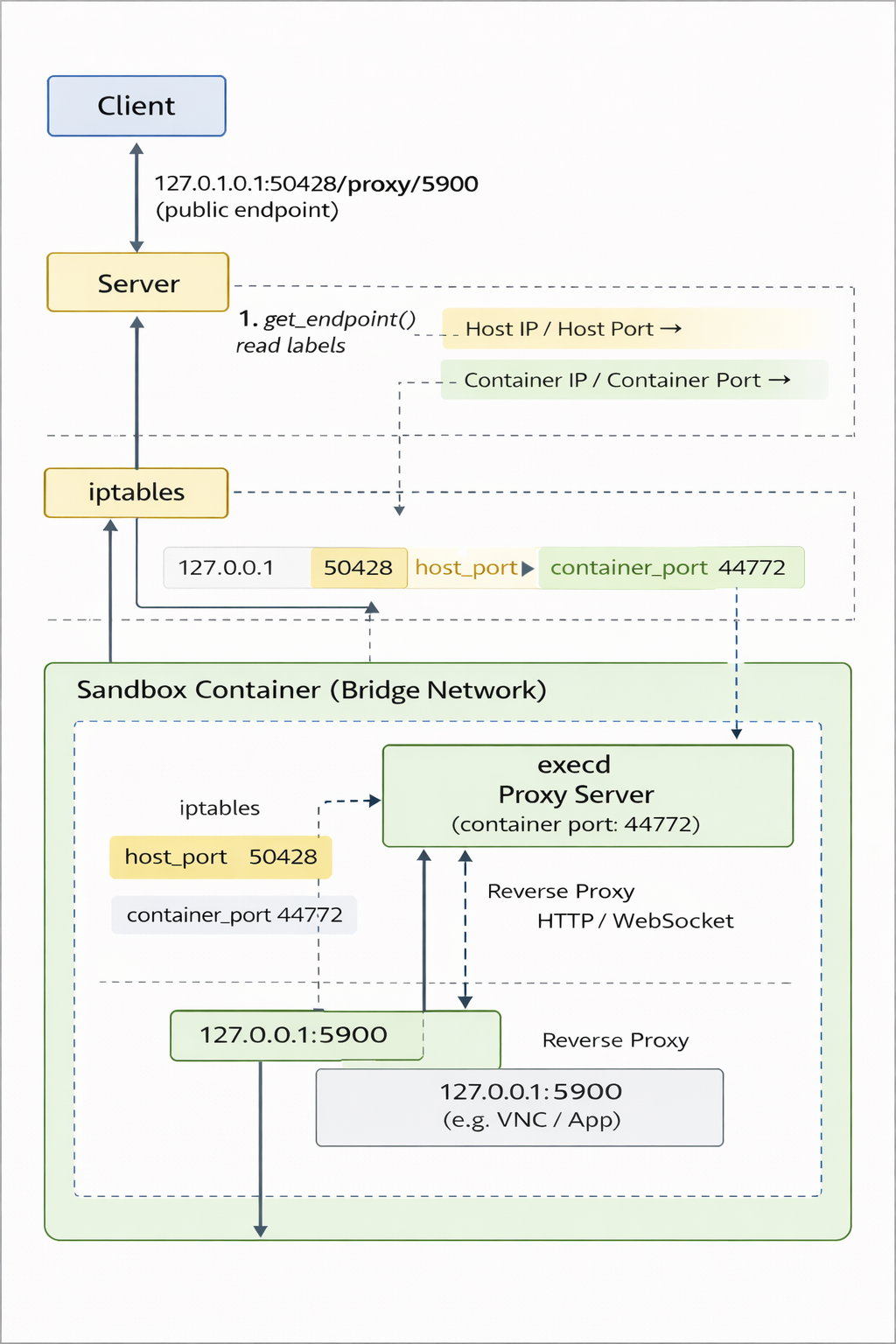
Single-host routing model
- Every sandbox container starts
execdlistening on container port44772.execdbundles a lightweight reverse proxy that intercepts requests with the/proxy/{port}prefix and forwards them to127.0.0.1:{port}inside the same container. - The Docker runtime binds only the host side of the execd proxy port (labeled
opensandbox.io/embedding-proxy-port). Callers useget_endpoint(..., port=X)to receive{public_host}:{host_proxy_port}/proxy/{X}, and execd transparently routes the request back to the sandbox service on portX. - Because the proxy preserves
Upgrade,Connection, and other HTTP headers, HTTP, Server-Sent Events, and WebSocket traffic share the same mapped host port without additional configuration. - With this setup, a single host port per sandbox suffices to reach all container ports. You can safely run many sandboxes on one machine without worrying about overlapping host port allocations.
- When the caller lives inside the same Docker network (e.g., another container or Kubernetes pod), use
get_endpoint(..., resolve_internal=True)to bypass the host mapping and return the sandbox IP (e.g.,172.17.0.3:5900) instead. - The diagram above shows the routing path: host traffic hits the proxy port, execd rewrites the request towards the target container port, and upstream services remain isolated within the sandbox.
Network modes
Host network mode (single-host constraints)
- Containers share the host network stack (
network_mode=host) so sandbox ports are directly accessible on the host. - Because each sandbox binds its ports on the host, this mode practically limits you to one sandbox instance per host unless you reserve dedicated ports per sandbox.
get_endpoint(..., port=X)returns{public_host}:{X}with no/proxy/prefix, so the caller needs to know the exact host port and the host must manage firewall rules for each sandbox port.
Bridge network mode (default for single-host deployments)
- Docker places sandboxes on an isolated bridge network, preventing container ports from being reachable without explicit mapping.
- For single-host scaling, OpenSandbox maps only execd’s proxy port (
44772) and, optionally, port8080. Any other container port stays private and is reached via the proxy. - The reverse proxy label (
opensandbox.io/embedding-proxy-port) identifies a host port that frontsexecd.get_endpoint(..., port=X)returns{public_host}:{host_proxy_port}/proxy/{X}, so all internal ports can share the same host binding. - Port
8080may also receive a direct host binding (opensandbox.io/http-port), providing a conventional HTTP endpoint without the proxy path when required. - This bridge setup lets a single machine host many sandboxes without port conflicts, because the same host proxy port can multiplex requests for HTTP, SSE, WebSocket, VNC, etc.
Operational notes
- If execd’s proxy port (
44772) or the optional8080host mapping is missing,get_endpointresponds with HTTP 500 and a message stating which mapping was unavailable. - Always keep the
/proxy/{port}prefix (including any additional path or query string) when embedding URLs in browser-based clients or SDKs so that execd can correctly dispatch the request. - This proxy-based approach means additional ports never need to be published on the host, simplifying firewall management and improving security.
此页内容来自仓库源文件:
docs/single_host_network.md