
Credential Vault
Credential Vault is OpenSandbox's outbound credential broker for sandboxed agents and developer tools. Real credentials are written to the egress sidecar by the host-side SDK, while the sandbox process only receives fake or empty credential values. When tools such as Claude Code, Git, curl, package managers, or model API clients make allowed outbound HTTPS requests, the sidecar matches the request against Credential Vault bindings and injects the required authentication headers on the way out. This lets existing tools keep their normal workflows while keeping real secrets out of the sandbox environment, command line, filesystem, and logs, reducing credential exfiltration risk from prompt injection or untrusted code.
Requirements
opensandbox-server>= 0.2.0egress>= 1.1.1- Python SDK >= 0.1.11
- JavaScript/TypeScript SDK >= 0.1.9
- Kotlin SDK >= 1.0.13
- Go SDK >= 1.0.3
- C# SDK >= 0.1.3
- Server config sets
[egress].image. - Server config sets
[egress].mode = "dns+nft". Credential Vault refuses to activate in DNS-only mode because direct-IP connections can bypass DNS policy. - Sandbox create request includes an outbound network policy.
- The outbound network policy should use
defaultAction="deny"and explicitly allow every host referenced by a credential binding. Default-allow remains temporarily supported for backward compatibility but emits a security warning. - Sandbox create request enables Credential Proxy.
- Sandbox pods are not running with an additional transparent service-mesh sidecar (for example Istio/Envoy injection) in the same network namespace. Credential Vault currently assumes the OpenSandbox egress sidecar is the only transparent outbound interception layer in the pod.
- The sandbox image has the tools you want to run. For Claude Code, use an image with Node.js and npm, such as the OpenSandbox code-interpreter image.
Migration notice
Credential Proxy still requires server [egress].mode = "dns+nft"; deployments that cannot provide nft enforcement cannot safely enable credential injection. Default-allow policies remain accepted during the compatibility period, but emit a security warning and should migrate to defaultAction="deny" before enforcement is tightened in a future release.
How It Works
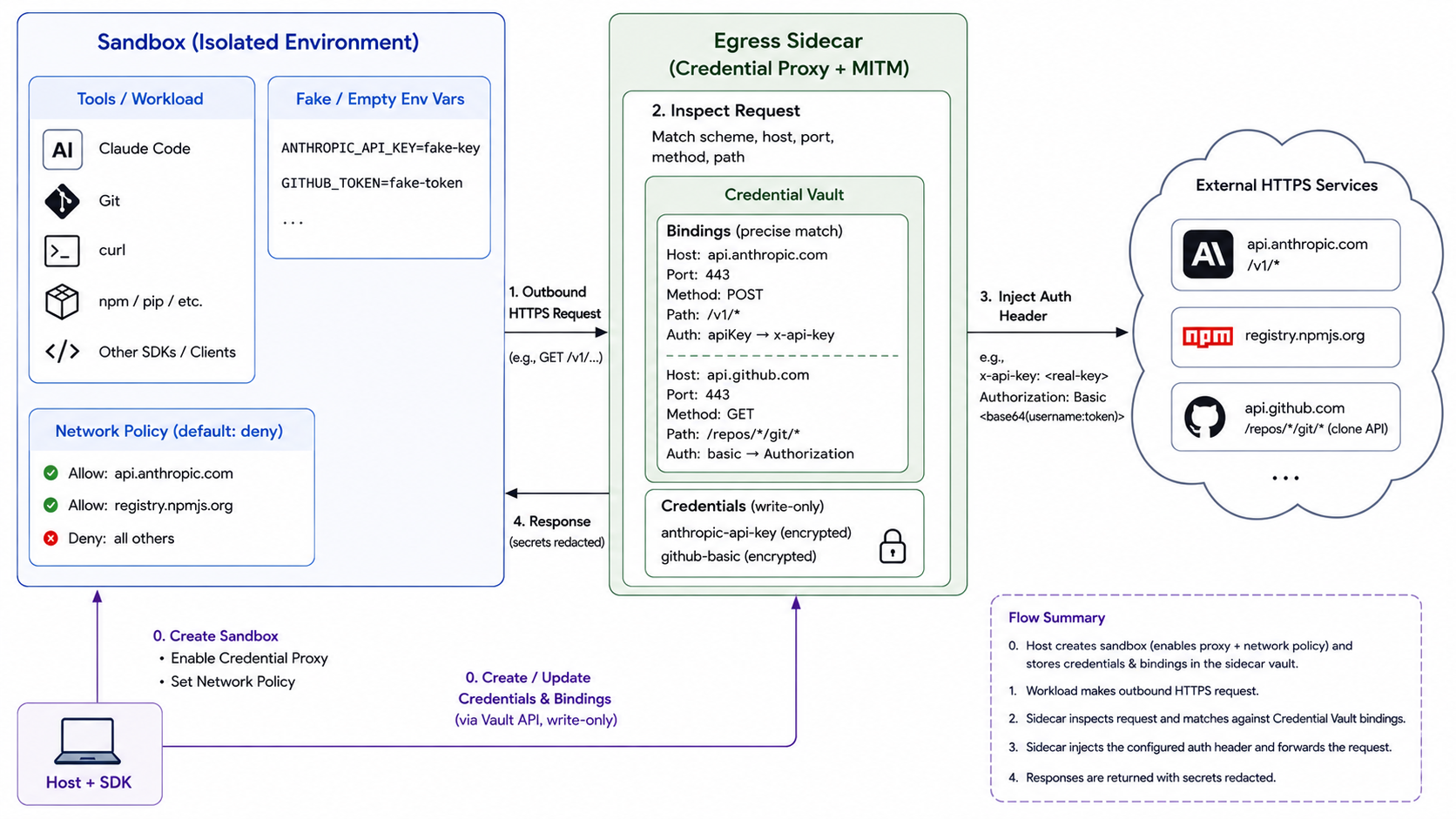
Credential Vault is implemented by the egress sidecar. A sandbox must be created with both an outbound network_policy / networkPolicy and Credential Proxy enabled. The lifecycle API field name is credentialProxy.enabled; SDKs expose that field using their language-specific naming conventions.
At a high level:
- The lifecycle server attaches the egress sidecar to the sandbox.
- The SDK writes credentials and bindings to the sidecar Credential Vault API.
- The sandbox process runs with fake or empty credential environment variables.
- When the sandbox makes an HTTPS request, transparent MITM in the sidecar inspects the request metadata.
- If exactly one binding matches the request scheme, host, port, method, and path, the sidecar injects the configured auth header and scoped placeholder substitutions.
- Secret values are redacted from vault responses and response headers.
When the active-vault check succeeds, requests that do not match any credential binding are forwarded unchanged. Credential path-safety checks apply only after a binding matches and the request would otherwise receive credentials. The active-vault check itself runs before binding selection for every intercepted flow, including requests to hosts that would not match a binding.
The active vault used by the MITM process is served over a local Unix domain socket inside the sidecar. The sandbox workload cannot fetch this active state over the normal server proxy path.
Each new flow conditionally reads that private endpoint with the cached opaque snapshot tag in If-None-Match. A 304 Not Modified response reuses the same immutable in-process snapshot without rendering or transferring secret values; a 200 OK response carries a fully validated replacement snapshot and a new opaque ETag. Successful create and patch responses are acknowledged only after the store has changed that tag, so the next flow immediately observes the new credentials without a cache-TTL delay.
The opaque tag is separate from the public vault revision. Deleting a vault and creating it again can reset the public revision to 1, but the recreated vault receives a different tag and cannot reuse plaintext from the deleted snapshot. A 404 Not Found from the private endpoint is the normal "no active vault" result: the MITM process clears its cached snapshot and continues without credential injection.
Runtime availability dependency
The private active-vault socket is a hard availability dependency for all traffic intercepted by Credential Proxy, not only traffic that ultimately matches a credential binding. A timeout, refused connection, unexpected EOF, 5xx response, malformed snapshot, or invalid ETag clears the affected plaintext cache and fails the request closed before any upstream forwarding. Small requests whose bodies are safely buffered receive a local 503 Service Unavailable response. Requests that are already streaming, may cross the streaming threshold, or have an unknown body length are terminated instead, because mitmproxy cannot safely synthesize a local response after streaming has started. Operators should monitor the sidecar and private socket as part of the egress data plane's availability.
Persistence Across Pause and Resume
In-memory state
Credential Vault entries are process-local memory in the egress sidecar; they are not part of the sandbox root filesystem or the BatchSandbox Pod template. Kubernetes pause deletes the Pod after snapshotting, so the fresh egress sidecar created by resume starts with an empty vault. Credential injection does not resume until a trusted client creates the credentials and bindings again.
Keep the original vault request or an equivalent secret-manager reference in a trusted control plane outside the sandbox. After the sandbox returns to Running, call the Credential Vault create API again before allowing work that depends on those credentials. Do not persist real credential values in sandbox metadata, environment variables, snapshots, or logs.
Docker pause/unpause retains the existing container processes, but any egress sidecar replacement or restart also creates a new in-memory vault and requires the same re-injection procedure.
Service Mesh Compatibility
Credential Vault depends on the egress sidecar's transparent redirect and MITM path. If the sandbox pod is also injected with a transparent service-mesh sidecar such as Istio/Envoy, both layers will try to intercept outbound traffic in the same network namespace. OpenSandbox does not currently support that combination for Credential Vault.
Use one of these operator patterns instead:
- disable mesh sidecar injection for sandbox pods that need Credential Vault
- keep mesh injection enabled, but do not enable
credentialProxy/ Credential Vault for those pods - move outbound policy and credential handling to a platform mechanism outside the sandbox pod if mesh injection is mandatory
For the underlying egress-sidecar limitation, see Egress.
Credential bindings are intentionally precise. A default-deny egress policy is required. Use a narrow path match, for example /v1/* for Anthropic API calls.
Auth Types
Each binding uses an auth rule to describe how the referenced credential is rendered into the outbound request:
bearer: injectsAuthorization: Bearer <credential>.basic: injectsAuthorization: Basic <credential>. The credential value must already be base64-encodedusername:password.apiKey: injects the credential value into the configured header name.customHeaders: injects multiple configured headers, each backed by its own credential.passthrough: does not inject an auth header. Use it withsubstitutionswhen the upstream API requires a credential in a path, query string, or body placeholder instead of a header.
Simple examples:
auth={"type": "bearer", "credential": "github-token"}Authorization: Bearer <github-token>auth={"type": "basic", "credential": "registry-basic"}Authorization: Basic <base64(username:password)>auth={"type": "apiKey", "name": "x-api-key", "credential": "anthropic-api-key"}x-api-key: <anthropic-api-key>auth={
"type": "customHeaders",
"headers": [
{"name": "X-Client-Id", "credential": "client-id"},
{"name": "X-Client-Secret", "credential": "client-secret"},
],
}X-Client-Id: <client-id>
X-Client-Secret: <client-secret>Scoped Placeholder Substitutions
Some upstream APIs require credentials in a request URL or body instead of a dedicated auth header. Credential Vault can handle those APIs without placing the real credential in the sandbox process. All auth types accept an optional substitutions list. Each substitution names a credential, a literal placeholder, and the request surfaces where replacement is allowed:
auth={
    "type": "passthrough",
    "substitutions": [
        {
            "credential": "client-secret",
            "placeholder": "__client_secret__",
            "in": ["body", "query"],
        }
    ],
}
Use type="passthrough" when the binding only performs substitutions and should not inject an auth header. You can also combine substitutions with bearer, basic, apiKey, or customHeaders when the same upstream request needs both header injection and placeholder replacement.
Substitution is disabled by default and is exact, literal, and case-sensitive. Only the configured surfaces are rewritten:
| Surface | Behavior |
|---|---|
path | Replaces placeholders in the request path and URL-encodes the credential value. If the rewritten path contains ambiguous path segments, encoded separators, or traversal-like content, the sidecar rejects the request instead of forwarding a secret-bearing URL outside the matched scope. |
query | Replaces placeholders in the query string and URL-encodes the credential value. |
header | Replaces placeholders in the original request headers, excluding hop-by-hop and security-sensitive headers such as Host, Content-Length, and forwarding headers. Substitutions run before Credential Vault injects auth headers, so the sidecar does not rewrite the credential headers it creates. |
body | Replaces placeholders in UTF-8 request bodies. For application/json, the replacement is encoded as JSON string contents, so put the placeholder inside a quoted JSON string. For application/x-www-form-urlencoded, the replacement is form-encoded. Compressed and multipart bodies are skipped. |
The sidecar applies all replacements for a surface against the original request text in one pass. Inserted credential values are not scanned again for later placeholders, which prevents one secret from accidentally rewriting another secret. When a body is rewritten, the sidecar updates Content-Length and removes Transfer-Encoding because the forwarded request now has a fixed-size buffered body.
The placeholder, raw credential value, URL-encoded value, form-encoded value, and JSON-escaped values are added to the active redaction set. A binding with substitutions that matched the request but did not find any placeholder emits a substitution-miss log without exposing credential values.
Example configuration:
await sandbox.credential_vault.create(
    credentials=[
        Credential(name="tenant-id", source={"value": "tenant 42"}),
        Credential(name="api-key", source={"value": "query secret+value"}),
        Credential(name="client-secret", source={"value": 'body "secret" value'}),
    ],
    bindings=[
        CredentialBinding(
            name="token-request",
            match={
                "schemes": ["https"],
                "hosts": ["api.example.com"],
                "methods": ["POST"],
                "paths": ["/tenants/__tenant_id__/token"],
            },
            auth={
                "type": "passthrough",
                "substitutions": [
                    {
                        "credential": "tenant-id",
                        "placeholder": "__tenant_id__",
                        "in": ["path"],
                    },
                    {
                        "credential": "api-key",
                        "placeholder": "__api_key__",
                        "in": ["query"],
                    },
                    {
                        "credential": "client-secret",
                        "placeholder": "__client_secret__",
                        "in": ["body"],
                    },
                ],
            },
        )
    ],
)
The sandbox can use placeholders instead of real secrets:
curl -X POST \
  "https://api.example.com/tenants/__tenant_id__/token?api_key=__api_key__" \
  -H "content-type: application/json" \
  --data '{"client_secret":"__client_secret__"}'
The upstream receives the rewritten request:
POST /tenants/tenant%2042/token?api_key=query%20secret%2Bvalue HTTP/1.1
content-type: application/json

{"client_secret":"body \"secret\" value"}
Egress Sidecar Configuration
| Environment variable | Default | Description |
|---|---|---|
OPENSANDBOX_EGRESS_CREDENTIAL_VAULT_REQUIRE_TLS | off | When enabled (true/1/on), credential vault write operations (create, patch, delete) require TLS, loopback transport, or X-Forwarded-Proto: https from a configured trusted proxy. When disabled (default), any authenticated request is accepted regardless of transport. Enable this in deployments where the egress sidecar is directly reachable from untrusted networks without a TLS-terminating reverse proxy. |
OPENSANDBOX_EGRESS_CREDENTIAL_VAULT_TRUSTED_PROXY_CIDRS | empty | Comma-separated IP addresses or CIDRs allowed to assert X-Forwarded-Proto: https. Forwarded transport headers from all other peers are ignored. Configure this when TLS terminates at a reverse proxy before the egress sidecar. |
OPENSANDBOX_EGRESS_CREDENTIAL_VAULT_REQUIRE_SCOPED_MATCH | off | When enabled, every credential binding must explicitly provide non-empty match.methods and match.paths, and paths cannot contain the host-wide /* pattern. Vault create and patch requests that omit either field are rejected instead of receiving compatibility defaults. Enable this for control planes that translate higher-level API tool definitions into Credential Vault bindings. |
The scoped-match setting is a fail-closed integration guard. It does not infer methods or paths from another platform's API tool definition. The caller that creates the vault must still copy the intended methods and paths into each binding and verify the sanitized binding readback.
SDK Quick Reference
All sandbox SDKs use the same wire contract. The main differences are naming and language style:
| SDK | Enable proxy on sandbox create | Vault entry point | Create / patch methods |
|---|---|---|---|
| Python | credential_proxy=CredentialProxyConfig(enabled=True) | sandbox.credential_vault | create(...), patch(...) |
| Go | CredentialProxy: &opensandbox.CredentialProxyConfig{Enabled: true} | sandbox.CredentialVault(ctx) or sandbox helpers | CreateCredentialVault(ctx, req), PatchCredentialVault(ctx, req) |
| JavaScript/TypeScript | credentialProxy: { enabled: true } | sandbox.credentialVault | create(request), patch(request) |
| Kotlin/JVM | .credentialProxyEnabled(true) or .credentialProxy { enabled(true) } | sandbox.credentialVault() | create(request), patch(request) |
| C#/.NET | CredentialProxy = new CredentialProxyConfig { Enabled = true } | sandbox.CredentialVault or sandbox helpers | CreateCredentialVaultAsync(...), PatchCredentialVaultAsync(...) |
The vault APIs return sanitized metadata. Plaintext credential values are write-only and are not returned by get, list, or patch responses.
Claude Code With Anthropic
This example installs Claude Code in the sandbox and calls the official Anthropic API endpoint. The real API key is read on the host and written to Credential Vault. The sandbox only sees a fake ANTHROPIC_API_KEY.
Before running the script:
export ANTHROPIC_API_KEY="sk-ant-..."
# Optional: export ANTHROPIC_MODEL="<a Claude Code supported Anthropic model>"
Run:
import os
from datetime import timedelta

from opensandbox import SandboxSync
from opensandbox.models.sandboxes import (
    Credential,
    CredentialBinding,
    CredentialProxyConfig,
    NetworkPolicy,
    NetworkRule,
    SandboxImageSpec,
)


ANTHROPIC_HOST = "api.anthropic.com"
ANTHROPIC_BASE_URL = "https://api.anthropic.com"
REAL_API_KEY = os.environ["ANTHROPIC_API_KEY"]


sandbox_env = {
    "ANTHROPIC_BASE_URL": ANTHROPIC_BASE_URL,
    "ANTHROPIC_API_KEY": "fake-key-inside-sandbox",
}
if os.getenv("ANTHROPIC_MODEL"):
    sandbox_env["ANTHROPIC_MODEL"] = os.environ["ANTHROPIC_MODEL"]


sandbox = SandboxSync.create(
    image=SandboxImageSpec(
        os.getenv("SANDBOX_IMAGE", "opensandbox/code-interpreter:latest")
    ),
    timeout=timedelta(minutes=15),
    env=sandbox_env,
    network_policy=NetworkPolicy(
        defaultAction="deny",
        egress=[
            NetworkRule(action="allow", target=ANTHROPIC_HOST),
            NetworkRule(action="allow", target="registry.npmjs.org"),
        ],
    ),
    credential_proxy=CredentialProxyConfig(enabled=True),
)

try:
    sandbox.credential_vault.create(
        credentials=[
            Credential(
                name="anthropic-api-key",
                source={"value": REAL_API_KEY},
            )
        ],
        bindings=[
            CredentialBinding(
                name="anthropic-api",
                match={
                    "schemes": ["https"],
                    "hosts": [ANTHROPIC_HOST],
                    "methods": ["GET", "POST"],
                    "paths": ["/v1/*"],
                },
                auth={
                    "type": "apiKey",
                    "name": "x-api-key",
                    "credential": "anthropic-api-key",
                },
            )
        ],
    )

    sandbox.commands.run(
        "npm install -g @anthropic-ai/claude-code --no-audit --no-fund"
    )
    result = sandbox.commands.run("claude -p '1+1'")
    output = "".join(part.text for part in result.logs.stdout)
    print(output)
finally:
    sandbox.kill()
    sandbox.close()
The Claude Code process reads the fake key from ANTHROPIC_API_KEY, but the outbound HTTPS request to api.anthropic.com/v1/* receives the real x-api-key header from Credential Vault. If your environment uses a private npm mirror, replace registry.npmjs.org in the network policy and the npm install command with that mirror host.
Git And Curl With Vault-Injected Credentials
Credential Vault can also protect credentials used by command-line tools such as git and curl. Keep the command free of real secrets and bind the request shape to the credential in Vault instead.
For a private Git repository, store a base64-encoded username:token value and bind it with basic auth:
Credential(name="git-basic", source={"value": "<base64(username:token)>"})

CredentialBinding(
    name="git-basic",
    match={
        "schemes": ["https"],
        "hosts": ["git.example.com"],
        "paths": ["/org/private-repo.git*"],
    },
    auth={"type": "basic", "credential": "git-basic"},
)
Then run the normal URL without embedding credentials:
GIT_TERMINAL_PROMPT=0 git clone https://git.example.com/org/private-repo.gitFor an API request that expects a token header, bind the path and method to an apiKey auth rule:
Credential(name="api-token", source={"value": "<token>"})

CredentialBinding(
    name="api-token",
    match={
        "schemes": ["https"],
        "hosts": ["api.example.com"],
        "methods": ["GET"],
        "paths": ["/v1/projects/123/variables"],
    },
    auth={"type": "apiKey", "name": "PRIVATE-TOKEN", "credential": "api-token"},
)
The sandbox command stays secret-free:
curl -fsS https://api.example.com/v1/projects/123/variablesBinding Guidance
- Use
defaultAction="deny"and only allow the service hosts required by the tool. Default-allow policies are deprecated because they may allow credential destination bypass and will emit a security warning. - Scope bindings by path whenever possible, for example
/v1/*. - Avoid overlapping bindings at the same precedence; ambiguous matches are rejected.
- Rejected requests (ambiguous paths, encoded separators crossing a binding boundary) return
403when the request body is small and fully known. Requests with bodies above the mitmproxy streaming threshold (~1 MiB) or with unknown length (chunked) cannot be answered with a403while the body is being streamed, so the sidecar drops the connection instead — either way the request is never forwarded upstream. - Do not put real secrets in sandbox
env, command arguments, files, or metadata. - Keep fake environment variables when a CLI refuses to start without a key; the vault-injected header is what authenticates the outbound request.
Migrating From ports
The match.ports field is deprecated. Port is now derived from scheme (https→443, http→80). Only ports 80 and 443 are supported; non-standard values are rejected with a validation error.
If you have existing bindings that use ports to narrow scope, migrate them to the equivalent schemes restriction:
| Before | After |
|---|---|
schemes: ["http", "https"], ports: [443] | schemes: ["https"] |
schemes: ["http", "https"], ports: [80] | schemes: ["http"] |
schemes: ["https"], ports: [443] | schemes: ["https"] (remove ports) |