
Isolation Sessions
Isolation sessions run a long-lived bash inside a bubblewrap namespace, so one sandbox pod can host many mutually isolated task runs without spinning up a new container. Each session gets its own PID, mount, tmpfs, and env namespaces; startup is sub-millisecond.
Table of Contents
- Requirements
- Overview
- How It Works
- Quick Start
- Session Lifecycle
- Workspace Modes
- Bind Mounts and Allowlist
- Profiles and Defaults
- Environment, UID, and Networking
- Filesystem Proxy
- Capabilities and Probing
- Server Configuration
- Limitations
- See Also
Requirements
Component versions needed for the features covered by this guide:
execd>= 1.0.20 for base isolation session support; >= 1.0.21 recommended forbinds,List sessions,uid_mode: "userns", and the default writable allowlist (/workspace,/mnt,/media,/data)opensandbox-server>= 0.2.1 — the server injectsCAP_SYS_ADMIN, unconfined AppArmor, seccomp, and protected-system-path settings, and the tmpfs mount required bybwrapwhen the execd image declaresbootstrap.execd.isolation- Python SDK >= 0.1.14 (
isolation.run_once/isolation.sessioncontext manager); >= 0.1.13 for the generated isolation client only - JavaScript / TypeScript SDK >= 0.1.10 (
isolation.runOnce/isolation.withSession) - Kotlin / Java SDK >= 1.0.16 (
isolation.runOnce()/isolation.withSession { ... }); >= 1.0.15 for the generated isolation client only - C# SDK >= 0.1.4 (
RunOnceAsync/WithSessionAsync) - Go SDK >= 1.0.4 (
IsolationRunOnce/IsolationWithSession)
The setpriv_available / userns_available fields on /capabilities were added after execd v1.0.21 and are only present on execd builds from main at the time of writing; older execd omits both fields (clients must tolerate their absence).
Host requirements (bwrap binary, CAP_SYS_ADMIN, overlayfs, etc.) are listed under Server Configuration → Host Requirements.
The published execd image includes the fail-closed native workload gate used during session startup. For a Linux source build, make build requires a C compiler plus static libc and produces bin/opensandbox-session-gate; run make build-session-gate and then sudo make install-session-gate before starting execd to install the helper at /opt/opensandbox/opensandbox-session-gate. Keep that path and its parent directory root-owned and not group- or world-writable.
Overview
| Concept | Boundary | Startup | Typical Use |
|---|---|---|---|
| Isolation session | bubblewrap namespaces inside one sandbox | ~100 ms to create; subsequent run in an existing session is near-zero overhead | Many short, mutually isolated task runs reusing one long-lived session |
Bash session (/session) | bash process, no extra namespaces | ms | Interactive REPL-style command sequences |
| Sandbox | container or pod | 100s of ms to seconds | Tenant, workspace, or user boundary |
| Secure runtime (gVisor / Kata) | user-space kernel or VM per sandbox | 10–500 ms | Hardware-level protection against container escape |
Session creation vs. per-run cost
Creating a session takes about 100 ms because execd waits briefly after starting bwrap to detect an immediately-exiting child. Once the session exists, each POST /run reuses the same bash process, so per-run overhead is negligible. Design workloads that amortize the create cost across many run calls in one session.
Good fits: RL rollouts, batch code grading, multi-tool agent runs — one sandbox per worker, many isolated tasks inside.
Not a fit: cross-language kernels (use /code), interactive REPLs (use /session), or hard trust boundaries against kernel exploits (use gVisor / Kata; see Secure Container Runtime).
How It Works
execd forks one bwrap child per session; bwrap sets up Linux namespaces, then execs a long-lived bash inside them.
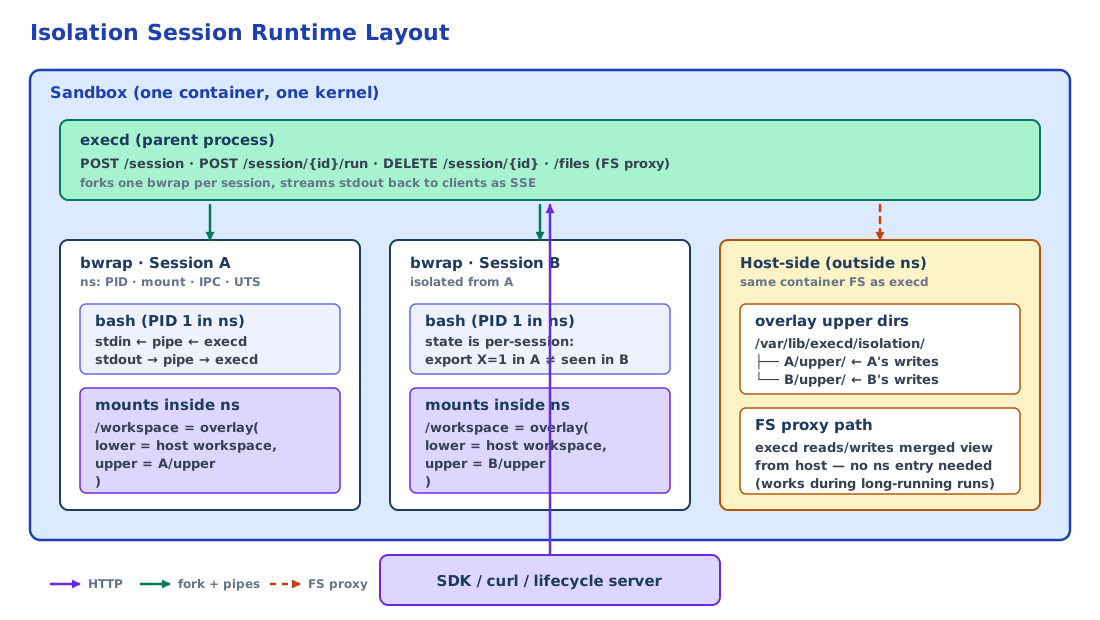
Two things the diagram doesn't show:
bashis long-lived, soexport X=1in onerunis visible to the nextrunin the same session (never in another session).- The FS proxy reads and writes the merged workspace view from outside the namespace, so uploads and downloads work while
bashis busy.
run request flow
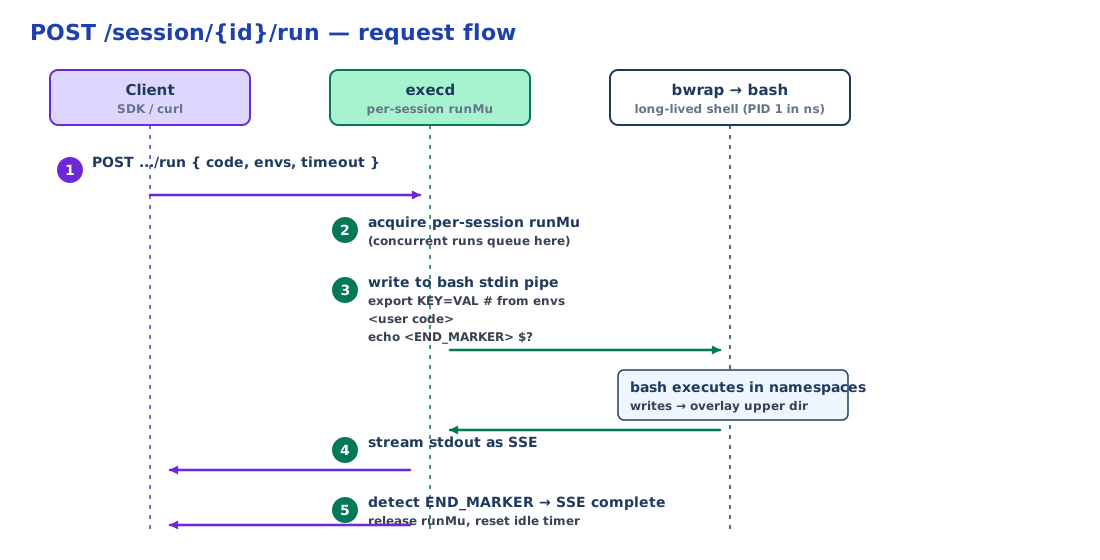
Non-happy paths:
| Event | What happens |
|---|---|
Run timeout_seconds elapsed | execd cancels the run context and sends SIGINT to the session process group, which interrupts the running command while the persistent shell stays alive; the run ends with an IsolatedError SSE event and the same session accepts the next run. |
bwrap process exited | The next run returns an IsolatedError SSE event with session process has exited; only ErrContextNotFound (session ID unknown) becomes an HTTP-level error. DELETE + recreate. |
| Idle timeout reached | GC runs the same teardown as DELETE. |
| Client disconnects mid-SSE | The Gin request context is cancelled and execd sends SIGINT to the running command; the run does not continue in the background, and the session stays alive for the next run. |
SSE keepalive
Foreground run streams commit their SSE response headers immediately and send a ping event every few seconds, so proxies and gateways with idle-timeout policies do not reap the connection while a long command (e.g. pip install) produces no stdout. Treat ping as a no-op event type.
Quick Start
curl
# Probe.
curl -s http://localhost:44772/v1/isolated/capabilities

# Create.
SESSION=$(curl -s -X POST http://localhost:44772/v1/isolated/session \
  -H "Content-Type: application/json" \
  -d '{
    "profile": "strict",
    "workspace": {"path": "/workspace", "mode": "overlay"},
    "idle_timeout_seconds": 300
  }' | jq -r .session_id)

# Run (SSE: stdout / error / complete).
curl -N -X POST "http://localhost:44772/v1/isolated/session/$SESSION/run" \
  -H "Content-Type: application/json" \
  -d '{"code": "export X=1; echo $X", "timeout_seconds": 30}'

# Second run reuses shell state.
curl -N -X POST "http://localhost:44772/v1/isolated/session/$SESSION/run" \
  -H "Content-Type: application/json" \
  -d '{"code": "echo $X"}'  # prints 1

# Delete.
curl -X DELETE "http://localhost:44772/v1/isolated/session/$SESSION"
Python SDK
from opensandbox import Sandbox
from opensandbox.models.isolated import (
    CreateIsolatedSessionRequest, IsolatedWorkspaceSpec, IsolatedRunOpts,
)

# Sandbox.create is an async classmethod, so await it before entering
# the async context manager.
async with (await Sandbox.create("python:3.11")) as sandbox:
    # One-shot.
    await sandbox.isolation.run_once(
        "python -c 'print(42)'", workspace="/workspace", profile="strict",
    )

    # Persistent session.
    async with sandbox.isolation.session(
        CreateIsolatedSessionRequest(
            workspace=IsolatedWorkspaceSpec(path="/workspace", mode="overlay"),
            profile="strict",
            idle_timeout_seconds=300,
        )
    ) as session:
        await session.run("export STAGE=train")
        await session.run("python train.py", opts=IsolatedRunOpts(timeout_seconds=600))
        await session.files.write_file("/workspace/data.csv", data_bytes)

    # Reattach after a client restart.
    handle = await sandbox.isolation.attach(known_session_id)
JavaScript / TypeScript SDK
await sandbox.isolation.runOnce("node -e 'console.log(1)'", "/workspace", {
  profile: "strict",
});

await sandbox.isolation.withSession(
  { profile: "strict", workspace: { path: "/workspace", mode: "overlay" } },
  async (session) => { await session.run("npm test"); },
);
Kotlin SDK
sandbox.isolation().runOnce(code = "python -c 'print(1)'", workspace = "/workspace")

sandbox.isolation().withSession(request) { session ->
    session.run("ls /workspace")
}
Session Lifecycle
Under /v1/isolated/ on execd. Use X-EXECD-ACCESS-TOKEN when execd has an access token configured.
| Method | Path | Purpose |
|---|---|---|
POST | /session | Create; returns {session_id, created_at}. |
GET | /sessions | List active sessions. |
GET | /session/{id} | Full state; echoes creation params so a stateless client can rebuild the handle. |
POST | /session/{id}/run | Foreground (default): SSE stream stdout / error / complete. Background ("background": true): returns 202 with a run handle. Runs on the same session are serialized. |
GET | /session/{id}/runs/{runId} | Background run status: running, exit_code, error, timestamps. |
GET | /session/{id}/runs/{runId}/logs | Background run combined output as plain text, with byte-cursor pagination. |
DELETE | /session/{id} | Destroy. |
GET | /capabilities | Probe. |
idle_timeout_seconds > 0 destroys idle sessions automatically; set to 0 to disable idle GC and always DELETE explicitly.
Background Runs
A background run starts code detached inside the session and returns immediately; the run's combined stdout/stderr and exit code are captured by execd, and the client polls them while other work continues on the session.
# Start detached; 202 returns {"session_id", "run_id", "started_at"}.
RUN=$(curl -s -X POST "http://localhost:44772/v1/isolated/session/$SESSION/run" \
  -H "Content-Type: application/json" \
  -d '{"code": "sleep 5 && echo done", "background": true}' | jq -r .run_id)

# Poll status until running=false.
curl -s "http://localhost:44772/v1/isolated/session/$SESSION/runs/$RUN"

# Read output (plain text). The response header EXECD-ISOLATED-TAIL-CURSOR
# carries the next byte offset for incremental reads.
curl -s "http://localhost:44772/v1/isolated/session/$SESSION/runs/$RUN/logs"
curl -s "http://localhost:44772/v1/isolated/session/$SESSION/runs/$RUN/logs?cursor=123"
Python SDK:
session = await sandbox.isolation.create(CreateIsolatedSessionRequest(
    workspace=IsolatedWorkspaceSpec(path="/workspace", mode="rw"),
))

run = await session.run_background("sleep 5 && echo done")
while (status := await session.run_status(run.run_id)).running:
    await asyncio.sleep(0.2)
print(status.exit_code)
logs = await session.run_logs(run.run_id)   # .text + .cursor for pagination
Background run semantics:
timeout_secondsis foreground-only; background runs are not time-limited.- Idle GC is suspended while a background run is active; after it finishes, the normal idle window applies. Deleting the session kills the run.
- Background runs require a writable log location, so sessions with a read-only (
ro) workspace reject them with400;rwandoverlayworkspaces are supported. - Runs share the session's process group, so session-level signals (e.g. the
SIGINTsent when a foreground run times out or is cancelled) also reach them. - Each
logsrequest returns at most 16 MiB; page through large output with the returned cursor. Per-run log retention is capped at 16 MiB — output beyond the cap is discarded when the run completes, so drain incrementally while the run is active if you need more than the first page. - A run whose session dies mid-flight reports
running: falsewitherror: "session terminated"; run records and their logs are removed when the session is deleted or garbage-collected.
Workspace Modes
| Mode | Semantics |
|---|---|
rw | Bind-mount read-write; writes persist on the host. |
overlay (default) | Copy-on-write via overlayfs; writes go to a per-session upper dir and vanish on DELETE. |
ro | Bind-mount read-only; writes fail with EROFS. |
Overlay upper dirs live under upper_root (default /var/lib/execd/isolation).
Overlay mode is one-directional for the files API
While a session is running, files-API writes on an overlay workspace land in the host upper directory and are not visible to session.run: the kernel caches the overlayfs directory entries at mount time, so host-side writes bypass the overlay the namespace already holds. The session.run → session.files direction always works. For bidirectional file exchange between the two views, use workspace mode: "rw" or a bind mount instead of overlay.
Because isolated-session state lives only in execd's memory, every session left under upper_root when execd exits is stale. Before publishing a new session, execd creates a durable cleanup record at <upper_root>/.execd-cleanup/<session-id>; on startup it recovers those records and removes the exact matching session directories. A record is retired only after the entire session subtree has been deleted, so partial deletion and transient filesystem failure retain a retryable identity across restarts. Residue that cannot be removed yet — e.g. an upper still referenced by a mount from the previous lifetime — stays counted toward upper_max_bytes and is retried by the idle collector.
Only recorded session directories are removed. Unrecorded children under upper_root, including allocator-shaped directory trees, are treated as operator data and are never reclaimed automatically. Directories left by execd versions that predate the cleanup registry therefore require explicit migration or manual cleanup; keep upper_root dedicated to execd and do not modify the reserved .execd-cleanup registry. In pooled / pre-provisioned sandboxes this prevents one occupant's session data from leaking to the next.
{ "workspace": { "path": "/workspace", "mode": "overlay" } }Multiple Overlay Mounts
A session can carry several independent overlay mounts via the overlays request field (the single workspace remains supported as sugar for a one-element list; when both are present, workspace is prepended):
{
  "overlays": [
    { "path": "/", "mode": "overlay" },
    { "path": "/workspace", "mode": "overlay", "persist": true },
    { "path": "/data/scratch", "mode": "overlay", "persist": false }
  ]
}- Each entry has its own mount semantics, so workspace files, system-level changes (
apt install→/usr, config →/etc), and additional project directories get independent copy-on-write uppers. - Mounts are applied shallow-first; a nested overlay (e.g.
/workspaceon top of a/root overlay) shadows its ancestors within its own subtree. Paths must be absolute and unique. persist(overlay mode only, defaulttrue):trueallocates a host upper directory underupper_root;falseuses an ephemeral tmpfs upper whose writes are discarded when the session ends.rw/roentries must not setpersist. An ephemeral upper lives inside the namespace only, so the files API servespersist=falseoverlays from their host-side content: in-session writes under such an overlay are not observable through the files API and files-API writes into it are rejected.- The files API routes each request to the session mount (overlay or bind) whose mount path is the longest prefix of the requested path; relative paths resolve against the first overlay. Paths outside every session mount — a
bindsdestination that was not configured,/etc, ... — are rejected with an error instead of being silently resolved against the workspace. The exception is the strict profile's private/tmp, which is host-backed and therefore served like any other session mount (see Profiles and Defaults). - Background runs use the first overlay for their log location: it must be
rw, oroverlaywithpersist: true; otherwise background runs are rejected.
Bind Mounts and Allowlist
extra_writable— paths bind-mounted read-write at the same path (source == destination).binds— explicitsource→destmappings, optionallyreadonly.sourcemust already exist;destmust already exist inside the namespace (bake it into the sandbox image).
{
  "workspace": { "path": "/workspace", "mode": "rw" },
  "extra_writable": ["/data/scratch"],
  "binds": [
    { "source": "/data/in",  "dest": "/mnt/in",  "readonly": true },
    { "source": "/data/out", "dest": "/mnt/out" }
  ]
}
Every source is checked against the operator-configured allowed_writable allowlist after symlink resolution, so symlinks cannot escape it. Default allowlist: /workspace, /mnt, /media, /data (subpaths allowed). Empty allowlist rejects all extra binds.
Bind destinations are also served by the session files API: paths under dest resolve to the host source directory, so session.files and session.run see the same data in both directions (a bind is a live mount, unlike the overlay-mode upper). The bind view mirrors the namespace exactly: symlinked entries are followed (bubblewrap binds do not redirect symlink traversal) and .wh.-prefixed names are ordinary files, not overlay whiteouts. Writes through the files API are rejected for readonly binds, matching --ro-bind inside the namespace. When a bind shares a dest with an overlay or extra_writable path, the bind shadows it in both the namespace and the files view.
Destination constraints keep the two views in agreement; session creation rejects otherwise-valid-looking configs:
- No duplicate
destacrossbindsentries (bwrap would expose only the last). - A
destmust not be a strict ancestor of another mount destination (binds,overlays, orextra_writable) — the later parent mount would hide that subtree in the namespace while the files API would still route into it. - A
destmust not be/run,/dev, or/proc(or nested under them) — the trusted base mounts are applied after every caller mount and always win.
Profiles and Defaults
The profile field currently controls only how /tmp is exposed inside the namespace:
| Profile | /tmp |
|---|---|
strict (default) | Session-private, host-backed bind (--bind <upper_root>/<session>/tmp /tmp) |
balanced | Shared with the sandbox (--bind /tmp /tmp) |
In the strict profile the private /tmp is backed by a host directory under the session's upper_root subtree, bind-mounted into the namespace, so session.files and session.run see the same /tmp content in both directions. The directory is created empty at session start, lives only as long as the session, and is removed with the rest of the session state on DELETE / idle collection. A binds entry or overlay sharing the /tmp destination still shadows it, exactly as inside the namespace. The balanced profile shares the sandbox's own /tmp, which stays outside the files API's mount view.
workspace.mode and env_passthrough are independent of the profile: when they are omitted, execd normalizes workspace.mode to overlay and env_passthrough.mode to deny regardless of which profile you pick. Set those fields explicitly if you want persistent workspace writes ("rw") or host env passthrough ("allow").
Environment, UID, and Networking
env_passthrough—mode: "allow"+keyswhitelists host env vars; defaultdeny. Per-run overrides go inIsolatedRunRequest.envs.uid/gidwithuid_mode: "setpriv"(default, real setuid/setgid drop) or"userns"(user namespace remap). Checksetpriv_available/userns_availablefrom/capabilitiesbefore requesting a mode.share_net: trueshares the sandbox's network namespace. Sandbox-level egress and Credential Vault policies still apply.share_net: falsecreates a private network namespace. Checksetpriv_net_available/userns_net_availablefrom/capabilitiesfor the requested uid mode: execd rejects unsupported combinations up front with503 NOT_SUPPORTEDinstead of failing inside bubblewrap. Before releasing the workload startup gate, execd opens the authenticated NetNS, obtains its real owning UserNS withNS_GET_USERNS, and bind-pins both below/run/execd/namespaces/<opaque-id>/. Any validation or pin failure aborts Session creation. Execd attempts pin cleanup on failed startup, process exit, explicit delete, idle collection, and runner shutdown; retryable failures retain Session ownership and are retried while execd remains alive. This applies to both UID modes; hardened network backends will requireuid_mode: "userns".
The legacy default remains unchanged in this phase: omitting share_net continues to share the sandbox network namespace. Namespace pinning alone does not enable Session egress or ingress.
Private Sessions are not recoverable across an execd restart. Deployments that enable them must treat execd as sandbox-critical and recreate the entire sandbox/container if execd exits; they must not launch a replacement execd inside the surviving mount namespace. Destroying the sandbox/container tears down that mount namespace and releases all pins. Execd intentionally does not scan and adopt opaque namespace-pin directories on startup because they do not carry a durable sandbox generation, so doing so could unmount another live process's resources.
Filesystem Proxy
Reads and writes the session's merged mount view — the workspace overlays plus every binds destination — from outside the namespace. This is how SDKs upload, download, and list without spawning a shell, including against bind-mounted persistent data. The files API serves exactly those session mounts: absolute paths outside every mount (namespace-only locations such as an unconfigured binds destination) are rejected with an error rather than resolving to a different file. The strict profile's private /tmp is host-backed and is part of the view (see Profiles and Defaults). All paths are per session under /v1/isolated/session/{id}/:
| Method | Path |
|---|---|
GET | files/info?path=... |
GET | files/download?path=... (supports Range and offset/limit) |
POST | files/upload (multipart: metadata + file) |
DELETE | files?path=... |
POST | files/mv |
POST | files/permissions |
POST | files/replace?verbose=true |
GET | files/search?path=...&pattern=... |
GET | directories/list?path=...&depth=N |
POST | directories |
DELETE | directories?path=... |
Writes on a ro workspace fail; writes on overlay land in the upper dir and vanish on DELETE, and while the session runs they are not visible to session.run (see Workspace Modes); writes on a readonly bind fail.
files/upload and files/replace stage their bytes in a private temp file next to the destination and rename it into place, so a write that fails partway — ENOSPC, an I/O error, execd being killed mid-copy — leaves the file it was replacing untouched. This requires write permission on the containing directory. When only the destination file is writable (for example a 0666 file in a 0555 directory), the write falls back to in-place truncation: it still succeeds, but a partial failure can truncate the old content. Because the rename installs a new inode, an existing hardlink to the old file keeps the old content, and a process that already holds the file open in an rw session keeps reading the bytes it opened. The replacement keeps the destination's mode, including setuid/setgid/sticky bits. Ownership is not preserved: every session view assigns the written file to the session's UID/GID, as the isolated write paths have always done, so a file owned by someone else before the write is reassigned. Extended attributes are also not preserved on the staged path: replacing a file drops POSIX ACLs, file capabilities such as security.capability, and other xattrs. The in-place fallback updates the existing inode and keeps them. A read-only destination is still rejected; a symlinked destination is written through to the file the namespace sees on a binds mount and in the strict profile's /tmp, while the workspace views reject a symlinked destination as they always have. The .osb-staging- name prefix is reserved: staging files are hidden from files/search and directories/list, and no file API accepts one as its path — read, stat, rename, or remove. Do not create user files with that prefix. A session that creates its own symlink pointing at a staging name can still read through it, which only exposes that session's own in-flight upload.
Capabilities and Probing
curl -s http://localhost:44772/v1/isolated/capabilities{
"available": true,
"isolator": "bwrap",
"version": "0.9.0",
"setpriv_available": true,
"userns_available": false,
"setpriv_net_available": true,
"userns_net_available": false,
"commit_supported": false,
"diff_supported": false
}available: false— the trusted native workload gate is missing or untrusted, bubblewrap is missing, or the host can't create the required namespaces (missingCAP_SYS_ADMIN, restricted user-ns sysctl, etc.).setpriv_available/userns_available— whether sessions withuid_mode: "setpriv"or"userns"can be created.setpriv_availablereflects only execd's default UID/GID; a session that requests a different UID/GID may still return503 NOT_SUPPORTEDwhen identity switching is unavailable.setpriv_net_available/userns_net_available— whether the uid mode can also create the private network namespace required byshare_net: false. In setpriv mode bwrap's loopback setup needsCAP_NET_ADMINin the execd container; userns mode owns its network namespace and usually tracksuserns_available. When a request asks forshare_net: falsein a mode whose flag is false, execd rejects it up front with503 NOT_SUPPORTEDand a diagnostic message instead of failing inside bubblewrap with an opaque workload-gate error.commit_supported/diff_supported— Phase 2 stubs, currently return503.
Server Configuration
Point execd at an optional TOML file:
| Flag | Env |
|---|---|
--isolation-config | EXECD_ISOLATION_CONFIG |
# Parent directory for per-session overlay upper dirs.
upper_root = "/var/lib/execd/isolation"

# Allocation-time threshold for total overlay upper-directory size (bytes).
# Existing sessions can write beyond this value.
# Default: 8 GiB. Set to 0 to disable the allocation check.
upper_max_bytes = 8589934592  # 8 GiB

# Sources allowed for extra_writable / binds (symlink-resolved).
# Default: ["/workspace", "/mnt", "/media", "/data"]. Empty = reject all.
allowed_writable = ["/workspace", "/mnt", "/media", "/data"]
Example: components/execd/configs/isolation.example.toml.
upper_max_bytes is checked when creating an overlay workspace (the default mode). If a successful usage scan reports a total at or above the configured positive limit, the new session is rejected. This setting does not cap writes by existing sessions and does not apply to rw or ro workspaces.
Deleting an overlay session can restore admission once its cleanup succeeds and total usage falls below the threshold. Deletion discards that session's private upper data, so preserve any data you need before deleting it.
Host requirements: bwrap and the trusted native workload gate in the execd image; CAP_SYS_ADMIN (and kernel.unprivileged_userns_clone=1 for uid_mode: "userns"); CAP_NET_ADMIN for share_net: false in uid_mode: "setpriv" (bwrap's loopback setup configures 127.0.0.1 inside the new network namespace); overlayfs in the kernel for overlay workspaces. The published image installs the gate automatically. Linux source builds must run make build-session-gate and then sudo make install-session-gate from components/execd before starting execd.
Note: /capabilities reports available: false when the native workload gate cannot be opened as a trusted executable or when bwrap itself cannot be started (missing binary or missing namespace capabilities). A missing overlayfs does not flip available — the overlay probe only influences Phase 2 commit/diff support, and default overlay-mode session creation can still fail at runtime on such hosts. If you rely on workspace.mode: "overlay", verify overlayfs support directly on the host.
Limitations
diff/commitare Phase 2 stubs, currently return503.- No hardware-level guarantee. Namespaces + seccomp only; pair with a secure runtime for kernel-exploit defense.
- Linux only. Non-Linux builds return
available: false. - Serialized runs per session — create multiple sessions for parallelism.
- Bind destinations must pre-exist in the sandbox image.