
Execd
Execd is the reference daemon for OpenSandbox's in-sandbox execution API. Sandbox SDK command and file operations use this API; sandbox creation and lifecycle management use the separate lifecycle server. Clients can also access workload-specific services through resolved sandbox endpoints, using those services' own protocols and clients.
For example, the AIO Sandbox example resolves port 8080 and uses AioSandboxClient for the image's shell, file, and browser API. Those requests are not execd command or file operations, even when an execd reverse proxy carries the traffic. See Implementation compatibility for the published contracts, current SDK endpoint assumptions, and backend-dependent features.
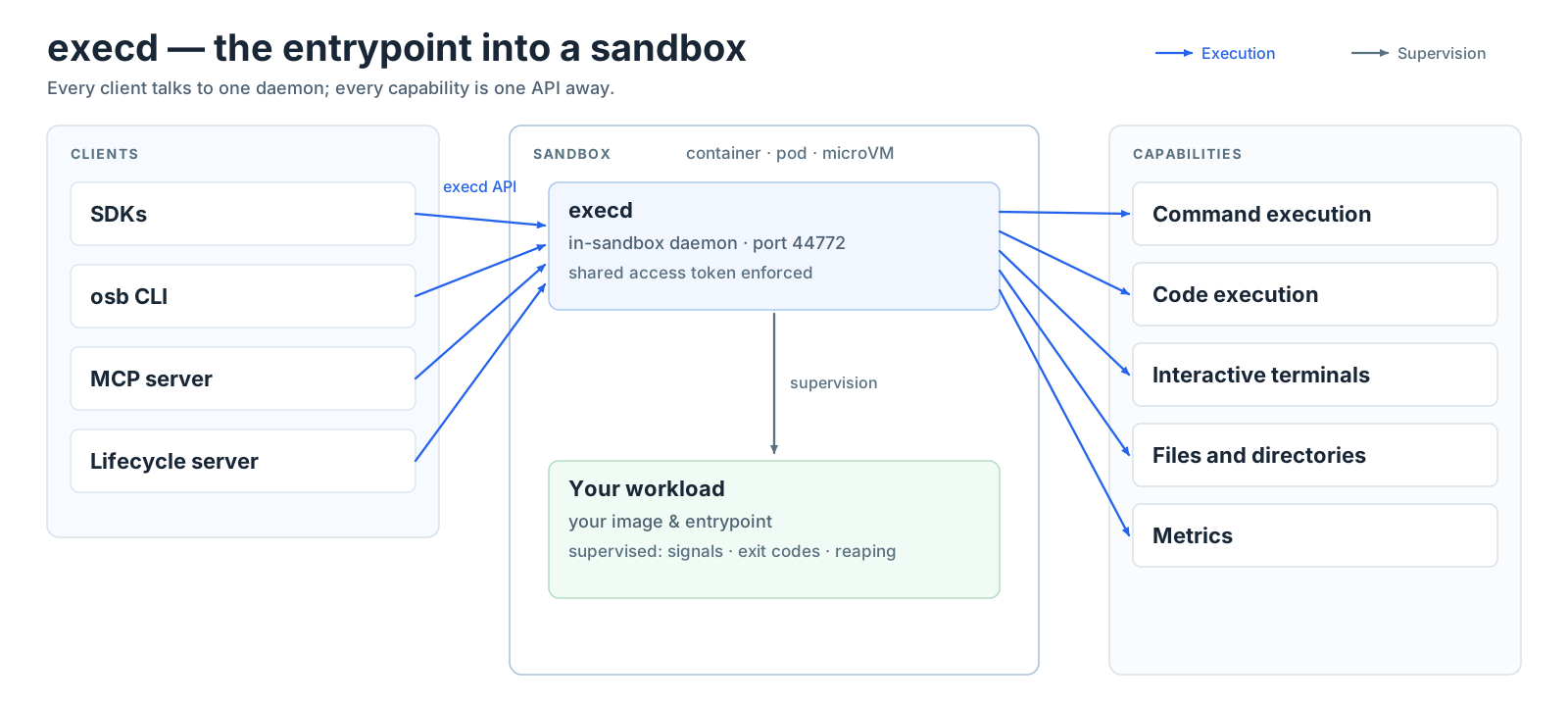
The reference platform provisions execd next to your entrypoint — as a staged binary in Docker, an init container in Kubernetes, or a baked-in part of a Fast Sandbox template image. Execd serves an HTTP API (default port 44772); when access-token protection is enabled, clients forward the token supplied by endpoint resolution. The published execd API spec describes the execution contract; some reference-implementation extensions, including PTY routes, are not yet covered by it.
Execd also fronts a small reverse proxy (/proxy/{port}), so one exposed host port can reach every port inside the sandbox — see Single-Host Network (Docker).
Capabilities at a glance
| Capability | What you get |
|---|---|
| Command execution | Run any command with live streamed output; foreground or background with status polling and log retrieval |
| Code execution | Jupyter-backed code contexts and kernels — the foundation of the Code Interpreter SDKs |
| Interactive terminals | A real terminal (PTY) over WebSocket, shareable with read-only viewers |
| Files and directories | Upload, download, list, search, move, chmod, remove, in-place content replace — the sandbox filesystem is fully scriptable |
| Isolated sessions | Run a shell inside a private namespace for untrusted or exploratory work |
| Metrics | Sandbox CPU and memory as point-in-time snapshots or a live stream |
API surface
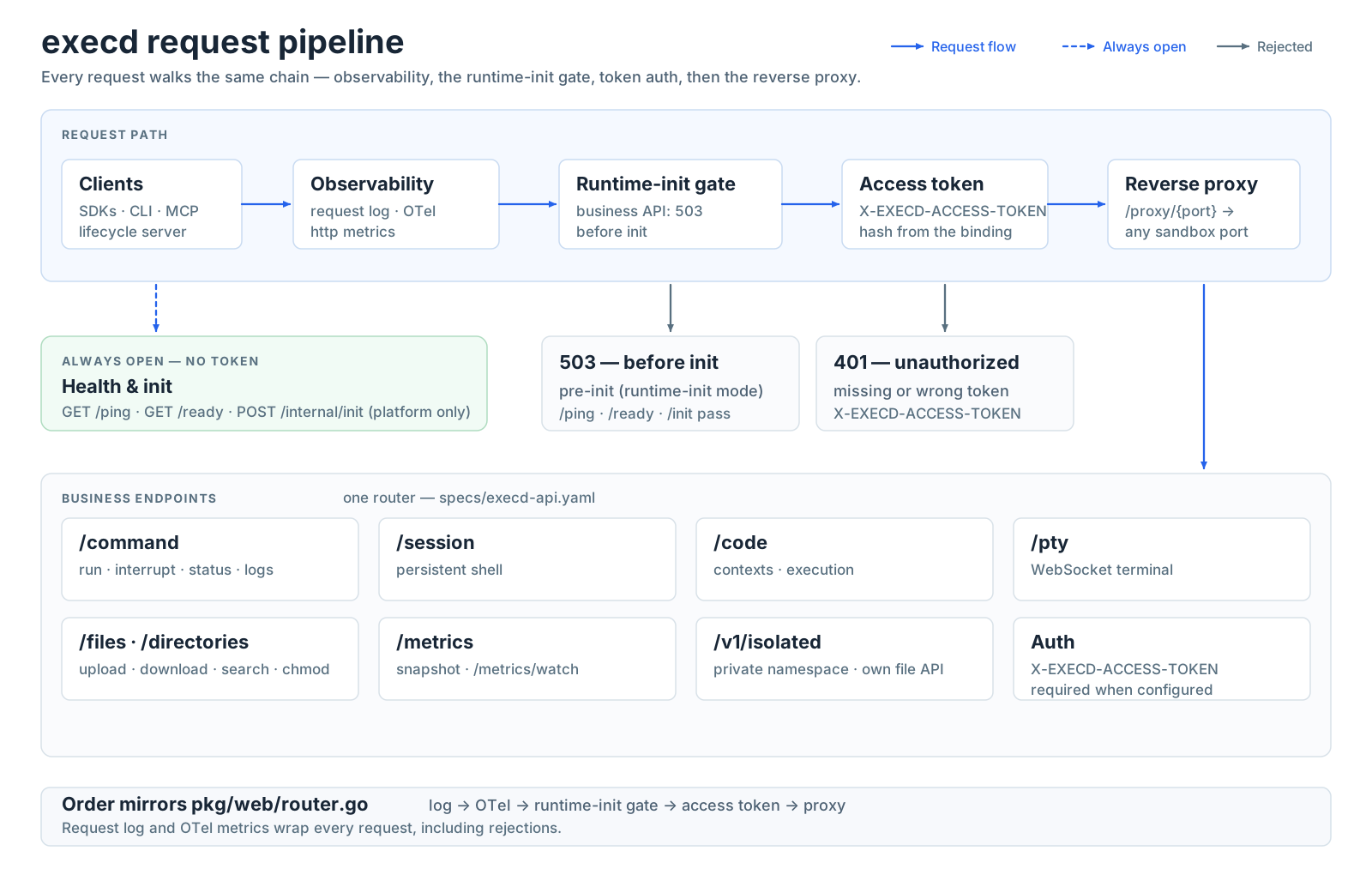
Everything execd exposes lives under one API. When the platform configures an access token, every endpoint below requires it in the X-EXECD-ACCESS-TOKEN header — only liveness and readiness are always open. PTY WebSocket handshakes also accept the browser-compatible credential described below. The contract lives in specs/execd-api.yaml.
| Area | Endpoints | Notes |
|---|---|---|
| Health | GET /ping, GET /ready | Liveness and readiness; no token required |
| Commands | /command | Run foreground or background, interrupt, poll status, fetch logs |
| Shell sessions | /session | Persistent stateful shell across calls |
| Code | /code, /code/contexts | Contexts and Jupyter-backed execution |
| Terminals | /pty | PTY sessions with a WebSocket attach point |
| Files | /files, /directories | The whole filesystem surface |
| Isolated sessions | /v1/isolated/* | Private-namespace shells with their own file operations |
| Metrics | /metrics, /metrics/watch | Snapshot and live stream |
| Reverse proxy | /proxy/{port} | Reach any sandbox port through execd |
Command execution
Commands can be submitted in two forms:
- Shell syntax — pipelines, redirection, environment expansion; what you would type at a prompt.
- Direct argv — a program plus literal arguments, no shell parsing. Safer when parts of the command come from untrusted input, and it preserves empty strings and special characters exactly.
Execution modes:
- Foreground returns the output as a live Server-Sent-Events stream while the command runs.
- Background returns immediately; you poll status and retrieve incremental logs. Completed background output stays retrievable for 24 hours, and running commands are never cleaned up.
Foreground stdout and stderr event text preserves the command's line endings (\n, \r, or \r\n). Concatenate event text for each stream to reconstruct its output; the last event may be an unterminated fragment.
A successful foreground POST /command ends with execution_complete carrying exit_code: 0. This optional field is omitted from background startup acknowledgements and code execution events; absence is not an exit status. Non-zero command exits retain error.exit_code on the error event. Older execd versions omit the successful exit code, so clients may retain their existing foreground-only completion inference. A stream that ends before a terminal event does not establish success.
Legacy SDK compatibility
SDKs built before sandbox-api 1.0.18 do not know the exit_code key, and when a consumer classpath resolves an incompatible kotlinx-serialization runtime, decoding the unknown key crashes with AbstractMethodError — the command finishes inside the sandbox but the client call never returns and logs nothing. Setting EXECD_SSE_LEGACY_COMPAT=true makes execd omit the field from both events for such fleets; successful commands lose nothing because the value is a constant 0 and newer SDKs infer it. The long-term fix is upgrading the sandbox SDK to a build that shades its serialization runtime (sandbox-api 1.0.18 or newer), which removes the dependency-conflict hazard for every field added in the future.
Bash-session runs stream one merged stdout event stream (session stderr is merged into it) with the same line-ending contract: event text preserves \n, \r, or \r\n, and concatenating event text reconstructs the run's output. Blank lines are preserved as events containing only the line ending, and the final event may be an unterminated fragment. A line longer than 16 MiB is split across several events, and only the last of them ends with the line ending.
Sessions use Bash when the image provides it and fall back to POSIX sh on minimal images — commands sent to a fallback session must be sh-compatible. Windows sandboxes are supported (environment names are case-insensitive; batch files require shell syntax).
Code execution
Code contexts are persistent Jupyter kernels managed by execd. You execute code in a context and receive streamed results — standard output, execution results, and errors — across multiple calls that share state, exactly like a notebook.
The official code-interpreter image ships Python, Java, Node.js, and Go runtimes with matching Jupyter kernels — see the Code Interpreter example. Code execution is available through the plain sandbox SDKs and the raw API.
Interactive terminals
Each terminal session is a real PTY served over WebSocket — not a wrapped command, so interactive programs (editors, REPLs, agent CLIs) behave normally.
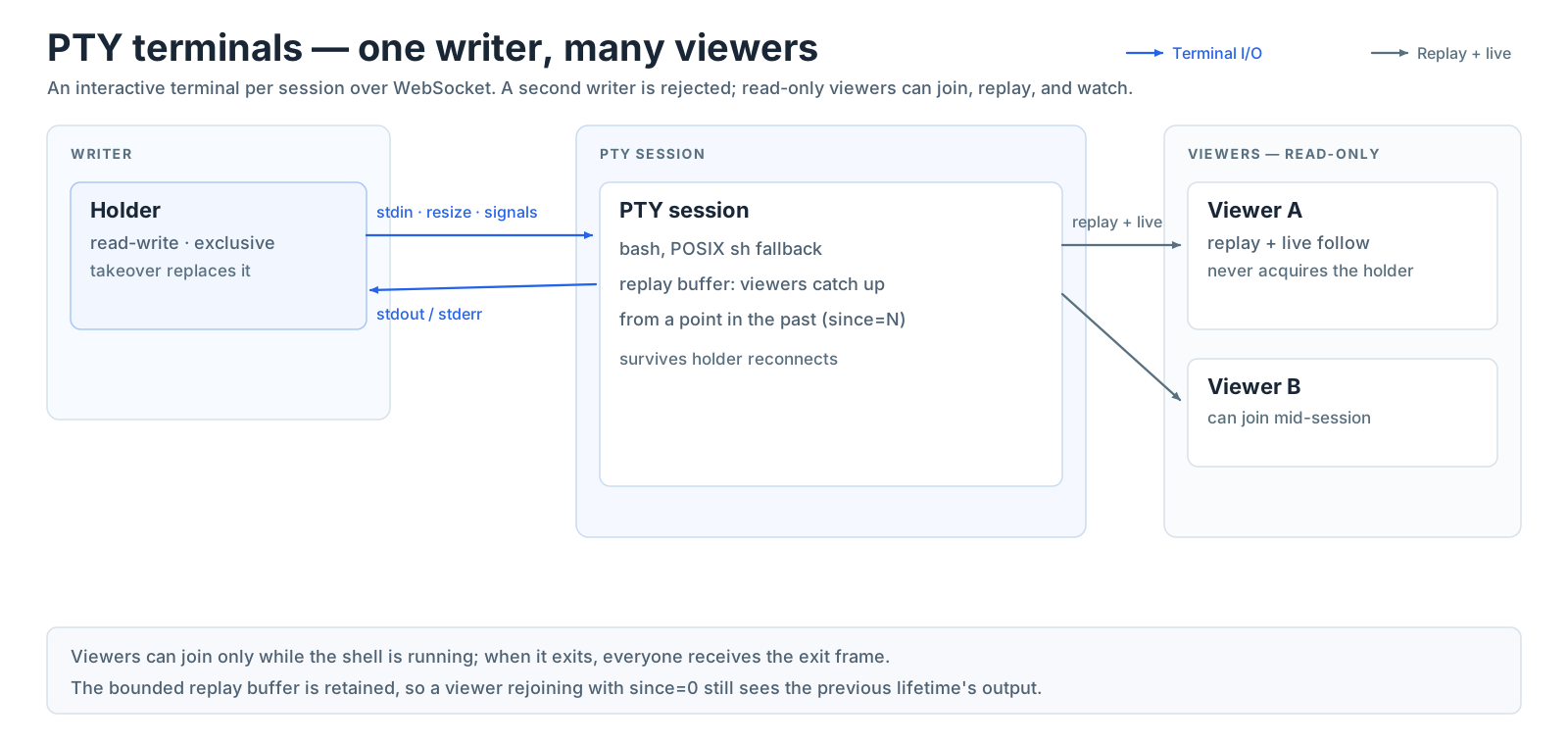
The sharing model is deliberate: exactly one holder owns the keyboard, and any number of viewers can watch. Viewers first replay what has already been printed, then follow live output — useful for supervision, debugging assistants, or letting a second person watch an agent work without giving it input.
Browser WebSocket authentication
Browsers cannot attach an arbitrary X-EXECD-ACCESS-TOKEN header to a WebSocket handshake. For GET /pty/{sessionId}/ws only, a browser can instead offer the opensandbox-pty application subprotocol and one credential subprotocol whose suffix is the existing execd token encoded as unpadded base64url:
const bytes = new TextEncoder().encode(execdToken);
const encoded = btoa(Array.from(bytes, byte => String.fromCharCode(byte)).join(""))
  .replace(/\+/g, "-").replace(/\//g, "_").replace(/=+$/, "");
const socket = new WebSocket(websocketUrl, [
  "opensandbox-pty",
  `base64url.bearer.execd.opensandbox.${encoded}`,
]);
Execd verifies the same token before upgrading the connection, removes the credential entry, and negotiates only opensandbox-pty. This works for both interactive attachments and ?mode=viewer. An explicit X-EXECD-ACCESS-TOKEN header takes precedence, including when it is empty or invalid; it never falls back to a subprotocol token. Duplicate credentials, malformed encoding, and a credential without the application subprotocol are rejected with 401. Existing header-authenticated clients do not need to offer a subprotocol. Other HTTP APIs, including PTY creation and deletion, still require the header when token protection is enabled.
This is a sandbox-wide credential, not a restricted terminal ticket. Obtain it through an authorized endpoint-resolution flow; do not place it in the URL or persistent browser storage. Use WSS in production: base64url is not encryption. Configure proxies and observability systems to redact the credential-bearing Sec-WebSocket-Protocol request header. An ingress signed URL satisfies ingress authentication only and does not replace execd authentication. The existing Origin policy and PTY disconnect/reconnect behavior are unchanged; deployments must enforce their browser-origin policy at the trusted gateway.
Files and directories
One API covers the whole filesystem tree: stream files in and out, list and search directories, inspect and change permissions, replace file contents, move and remove paths. The file APIs in every sandbox SDK are a thin wrapper over these endpoints.
Uploads through the filesystem route are staged next to their destination and renamed into place, so a copy that fails partway leaves the file it was replacing untouched instead of truncating it. This requires write permission on the containing directory. When only the destination file is writable (for example a 0666 file in a 0555 directory), execd falls back to an in-place write: the upload still succeeds, but a partial failure can truncate the old content. The replacement keeps the destination's mode, including setuid/setgid/sticky bits, and, where the platform allows it, its owner and group. Staging replaces the inode, so extended attributes such as POSIX ACLs and file capabilities are not preserved on the staged path; the in-place fallback keeps them. Staging files are created privately when a destination already exists, and execd hides their names from directory listings and search results. The isolated-session file routes (/v1/isolated/session/:sessionId/files/upload and files/replace) stage and rename the same way, with the same in-place fallback, across every session view: the overlay upper directory, binds destinations, and the strict profile's private /tmp. Those routes also reassign the written file to the session's UID/GID rather than preserving an existing owner, matching the behavior they have always had.
Filesystem execution identity
On Linux, a trusted backend can select the identity performing ordinary file operations by prefixing the file API path with /v1/filesystem/{uid}/{gid}. Both IDs are required decimal integers between 0 and 4294967294. For example, GET /v1/filesystem/1001/1001/files/download?path=/workspace/session-b/result.txt reads the file as UID 1001 with primary GID 1001. The same prefix supports all ordinary file and directory operations, including uploads, metadata, search, replacement, rename, deletion, and permission changes.
Each request runs in a separate worker process with the selected credentials. Supplementary groups come from the selected user's system account; an unknown numeric UID has no supplementary groups. Account or group lookup failures other than an unknown UID fail the request. The worker never inherits Execd's supplementary groups as a fallback. Execd must have permission to establish the requested credentials; failure does not retry the operation as Execd. Relative paths resolve from /, and ~ uses the selected account's home directory (or / for an unknown UID). Workers do not inherit Execd's environment.
Linux checks path traversal, parent directory access, file access, and metadata changes under that identity. Upload owner, group, and mode remain target metadata and cannot grant the worker additional privileges. Requests with different identities can run concurrently without changing Execd's credentials.
To share a sandbox between conversations, provision a separate user and workspace for each conversation, allow the desired read access, and reserve directory write access for the owner. Deletion and rename permissions depend on the parent directory, so read-only file modes alone are insufficient. Keep sandbox API credentials in the trusted backend that selects these identities. This feature does not provide a separate mount namespace or a tenant isolation boundary.
The existing /files and /directories routes retain their default identity. The identity-prefixed routes require Linux and a supporting Execd version. Older servers return an unsupported route instead of silently ignoring identity options; clients must not fall back to the unprefixed routes.
Isolated sessions
An isolated session runs a shell inside a per-execution bubblewrap namespace — a private view of mounts and identity, created fresh for each session:
- Explicit bind mounts bring host paths in, read-only or read-write.
- Writes are confined to an allowlist, enforced against fully resolved paths, so a symlink cannot redirect a bind outside it.
- Session creation reports what the current environment supports, so callers can adapt instead of guessing.
See the Isolation Sessions guide for the full workflow.
Layered security
Execd applies defense in depth to everything a sandbox runs:

- Sandbox boundary — resource limits, identity, and the isolation runtime (runc container, gVisor, Kata, Firecracker microVM) are chosen at create time (see the Secure Container guide).
- Hardening floor — when the operator enables it, every user process is launched through a native launcher that drops capabilities, sets
no_new_privs, installs a syscall denylist, and confines filesystem writes with Landlock. - Isolated sessions — the per-execution namespace above, for work that needs its own boundary.
- Optional eBPF audit — records process exec, network connect, and privilege changes, scoped to the sandbox's own cgroup. Ships as a separate
execd-ebpfbuild variant, not in the default image.
Each layer reports its state — active, degraded, or unsupported — so clients can verify what is actually enforced rather than assume. One boundary to keep in mind: execd's lifecycle hooks (setup commands the platform configures) run as trusted code inside the sandbox; they are convenience, not a security control.
Supervision and exit codes
Execd can act as the sandbox's init process. It reaps orphaned children, forwards signals to your entrypoint, and propagates its exit code to the runtime — so sandbox states like Terminated and Failed reflect what your process actually did, and long-running sessions do not accumulate zombie processes.
A fresh identity per allocation
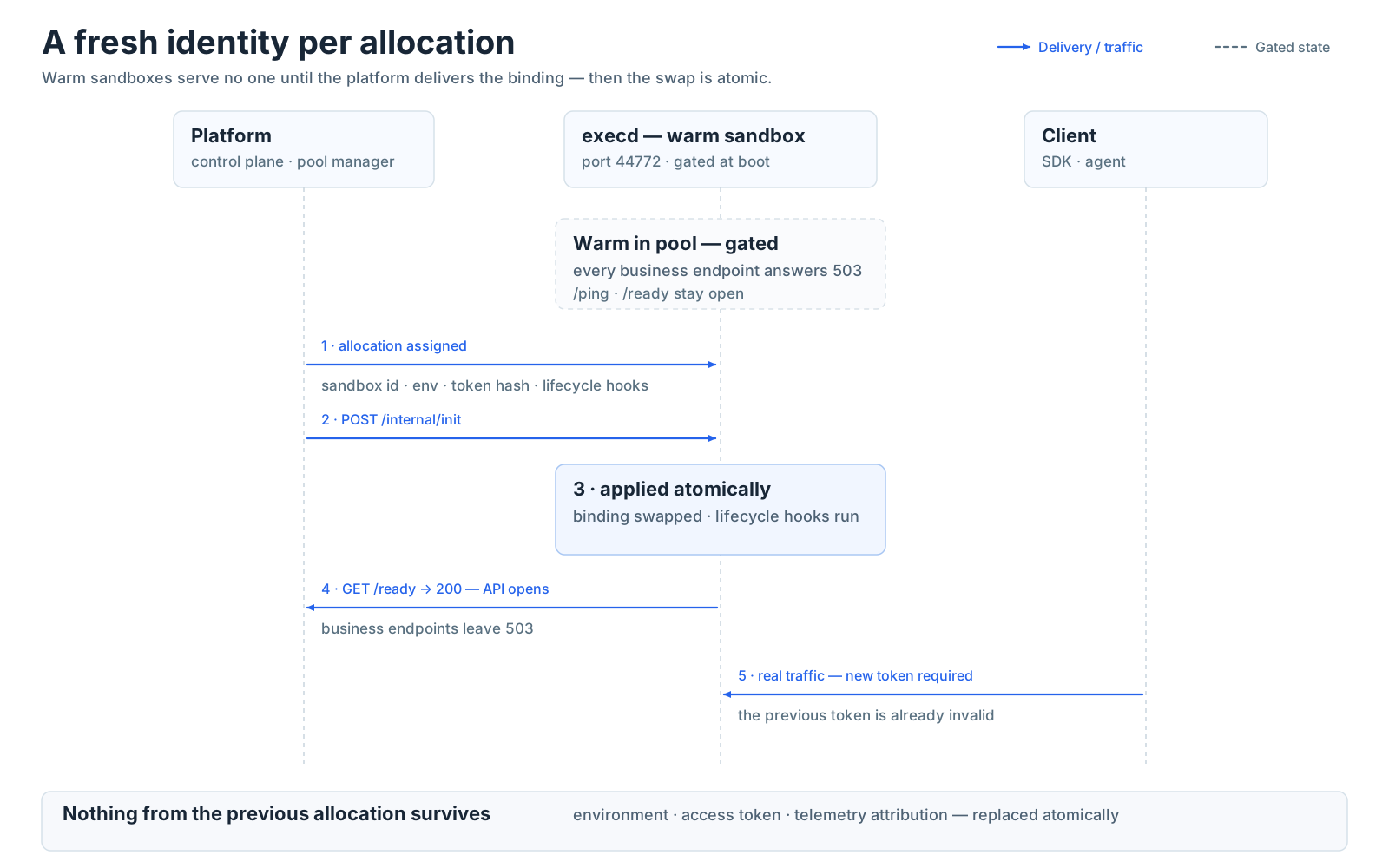
Sandboxes can be pre-warmed in pools and reused across allocations. Execd makes this safe: the platform delivers a per-allocation binding — sandbox ID, environment, access token, lifecycle hooks — at assignment time, and execd applies it atomically before the API opens. While a warm sandbox waits for its binding (and until startup completes), every business endpoint answers 503; only GET /ping and GET /ready respond. Environment variables, tokens, and telemetry attribution never leak between the sandbox that came before and yours.
Observability
Execd exposes local CPU and memory metrics as a snapshot and as a live stream, and exports OpenTelemetry metrics when the platform configures an endpoint — attributed to your sandbox ID and allocation. See telemetry for the metric list and how export is configured.
Command-related operational records add only the top-level JSON field command_id, equal to the runtime-generated ID in the SSE init event and command status, output, and interrupt endpoints. Query this field to correlate existing records. No public wire field or header is added. Noncommand records are unchanged.
Existing formatted messages, levels, event counts, ordering, and sampling remain unchanged, including the ID already present in the init message. Received commands remain INFO; start and wait failures remain ERROR. Successful verbose SSE writes, including completion, remain INFO; successful stdout/stderr and keepalive writes remain quiet. Correlation is assigned before output workers start, including Unix output before init, without emitting init or committing headers earlier.
A background execution_complete acknowledges startup, not process termination. Successful background termination produces no additional log record; foreground completion follows a successful wait. These sampled operational logs are not an audit trail. The existing sampler groups by level and fully formatted message, retaining the first 100 per one-second tick and then every 100th matching event. The added field neither changes this key nor bypasses sampling; even ERROR records may be dropped. Use the command status and output APIs for lifecycle state and output.